Where to Find UX Flow Inspiration in 2026 — 7 Sources for Real User Journey Examples
Looking for UX flow examples? Compare 7 sources for real user-journey references in 2026 — onboarding, paywall, checkout, and more — across libraries and public options.

Useful sources for UX flow inspiration in 2026 include Gummble UX Flows (organized by categories such as onboarding, paywall, and checkout), Page Flows (video-oriented walkthroughs), and Mobbin (screen and flow references). Free options such as app-store listings, manual capture, and public walkthrough videos can complement a library when you need a specific app or state. Verify each provider's current catalog and offer before choosing one.
Where can you find UX flow examples in 2026?
Seven practical sources are Gummble UX Flows, Page Flows, Mobbin, App Store / Play Store listings, manual install and screen recording, YouTube walkthroughs, and designer posts on X.
Choose by the job: use a searchable library for repeat research, video walkthroughs for motion and transitions, and manual capture when a particular app or edge case is missing. Gummble supports free browsing, while its current paid options and included capabilities are listed on the pricing page.
| Source | Price | What it covers | Best for |
|---|---|---|---|
| Gummble UX Flows | Free browsing; check current plans | Flows organized by category with supporting context | Searchable, category-led research |
| Page Flows | Verify current offer | Video-oriented walkthroughs | Motion and transition study |
| Mobbin | Verify current offer | Screen and flow references | Comparing its available catalog and filters |
| App Store / Play Store | Public listings | Publisher-selected marketing screens | Quick positioning check |
| Manual install + screen record | Device/app access + time | States you can access yourself | Apps or states missing from a library |
| YouTube "app review" videos | Public videos | Coverage varies by video | Narrated or older-version references |
| Designer Twitter / X | Free | Flow analyses + commentary | Passive discovery |
Why does a UX flow matter more than a single screen?
A single screen and a flow answer different questions. A login screen can help with layout and copy, while a sequence can reveal how a user arrives, progresses, recovers from an error, and exits. Use both when the decision depends on interaction rather than appearance alone.
A full flow answers questions a single screen can't:
- Welcome → How does the user start?
- Email → What format does the input field use?
- Verification → Magic link or OTP?
- Loading → What's the latency? What's the message?
- Success → Where does the user land?
- Error → How is the failure presented?
Source-by-source breakdown
1. Gummble UX Flows — free browsing with paid workflow options
Gummble's UX Flows library organizes available user-flow records by category:
- Onboarding — available onboarding journeys and screens
- Paywall — subscription and upgrade references
- Checkout — E-commerce checkout flows
- Login — Auth flows including magic link, OTP, social
- Search — Search experience patterns
Best for: Designers and PMs who want searchable access to specific flow types across real apps, with editorial context where published.
Pricing: Free browsing is available. Review the current plans and account-specific offer for collections, downloads, MCP access, Figma export, and other paid capabilities.
2. Page Flows — video-oriented references
Page Flows is a video-first journey-reference option; verify its current catalog directly.
Best for: Motion designers + UX researchers who want to study transitions, animations, and timing in addition to screen-by-screen.
Trade-off: A video-oriented format is useful for motion study, while a screen-oriented library may be easier for side-by-side static comparison. Verify the current catalog and export options directly.
3. Mobbin — broad catalog
Mobbin provides a screen-and-flow reference catalog. Check its current official catalog, platform coverage, and plan limits directly.
Best for: Designers whose required apps and industries are represented in its current catalog.
Trade-off: The broad catalog may be unnecessary for occasional use. Check the live billing cycle and refund terms.
4. App Store + Play Store — Free
Official screenshots are publisher-selected marketing assets rather than a guaranteed record of an entire journey.
Best for: Sanity-check what an app's marketing positions as the key flow.
Trade-off: Publisher-selected assets may omit errors, edge cases, and edit/delete states.
5. Manual install + screen record — Free
Install the app on a device, screen-record while you complete the flow yourself.
Best for: Apps not on Gummble/Mobbin, or when you need to study an obscure edge case.
Trade-off: Manual capture adds setup, navigation, annotation, and privacy-review work for every app.
Tools: iOS Screen Recording (built-in), Android Screen Record, QuickTime on Mac.
6. YouTube "app review" videos — Free
Public reviews and tutorials may show portions of an app journey or a longer walkthrough.
Best for: Older app versions, narrated walkthroughs.
Trade-off: Quality varies. Often shows the reviewer's reaction more than the flow itself.
7. Designer Twitter / X — Free
Designers post flow analyses with screen recordings under #productdesign and #UIDesign.
Best for: Discovery + designer commentary.
Trade-off: Discovery depends on the platform's current ranking, search, and access rules.
Comparison table
| Source | Retrieval style | Journey context | Supporting context | Offer |
|---|---|---|---|---|
| Gummble UX Flows | Search and category browsing | Available flow records | Editorial context where provided | Free browsing; check current plans |
| Page Flows | Video-oriented browsing | Walkthroughs in its current catalog | Verify current annotations | Verify current offer |
| Mobbin | Search and catalog browsing | Screens and flows in its current catalog | Verify current annotations | Verify current offer |
| App Store | Browse publisher listings | Marketing selections, not complete journeys | Publisher copy | Public listings |
| Manual capture | Navigate the app yourself | The states you can access | Your own notes | Time and any app access costs |
| YouTube | Search public videos | Varies by video | Creator commentary where provided | Public videos |
| Twitter / X | Search or follow posts | Varies by post | Creator commentary where provided | Public posts |
Stack recommendations
Indie designer / freelancer
- Gummble — searchable flow references; check the current paid offer if you need workflow features
- App Store free for sanity-check
- YouTube + Twitter for daily passive feed
PM at small startup
- Gummble — flow research and pattern hubs; verify the current paid offer
- Manual capture for niche competitors not on Gummble
Senior designer at funded startup
- Mobbin when its current catalog covers the apps and industries you need
- Page Flows for motion-oriented walkthroughs
- Gummble for category-led browsing and its current paid workflow options
Free-only stack
- App Store + Play Store screenshots
- Manual capture for apps you have access to
- YouTube for "app review" walkthroughs
- Twitter for designer-shared flows
This stack works best when occasional manual research is acceptable. Consider a paid library when repeated searching, organizing, exporting, or agent access saves enough project time to justify the current offer.
What flows to study (by role)
B2B SaaS PM
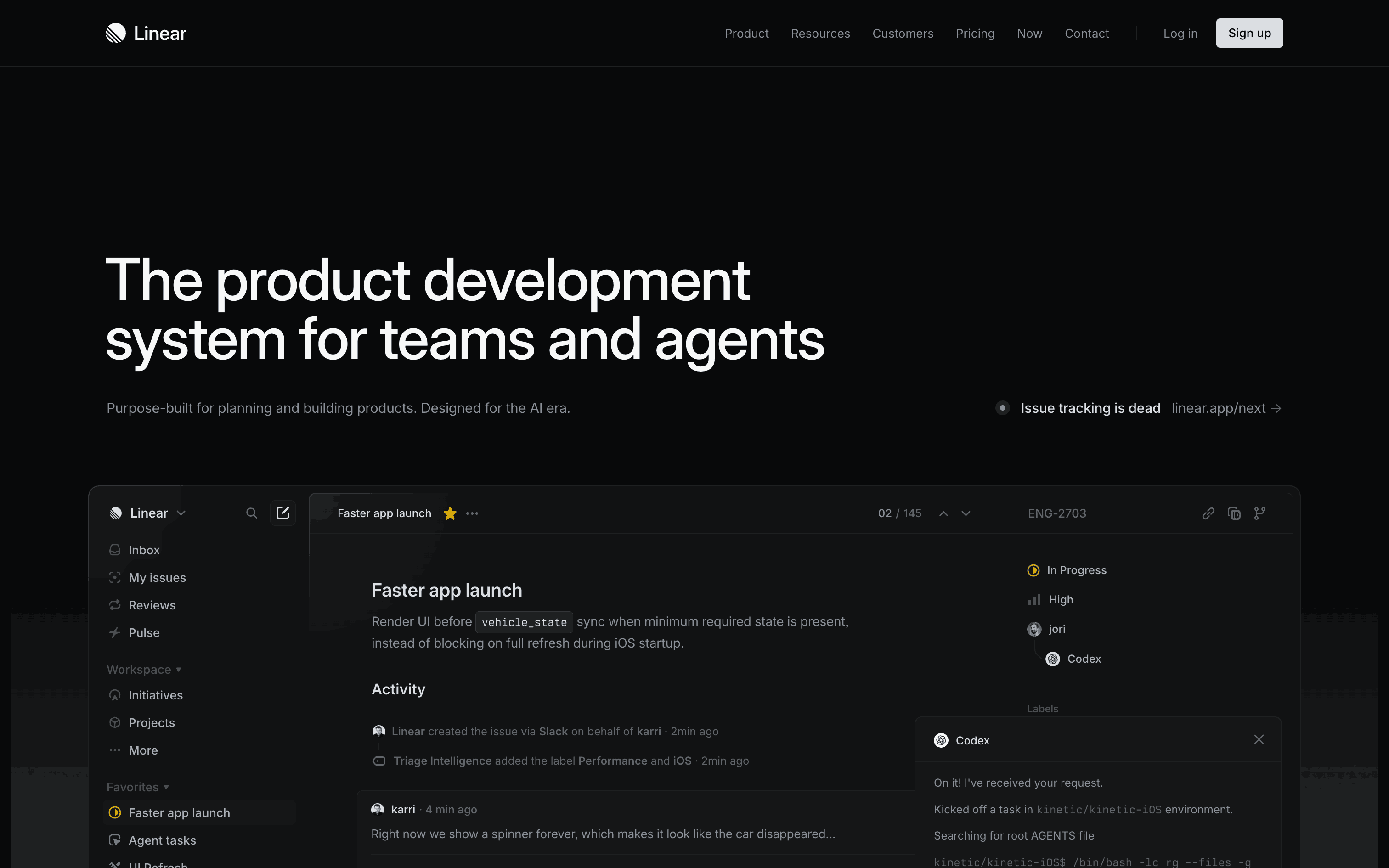
- Onboarding (Linear, Notion, Stripe)
- Empty states relevant to the product's core objects
- Pricing / upgrade prompt (Stripe, Vercel)
- Settings (reveals product flexibility)
Consumer app designer
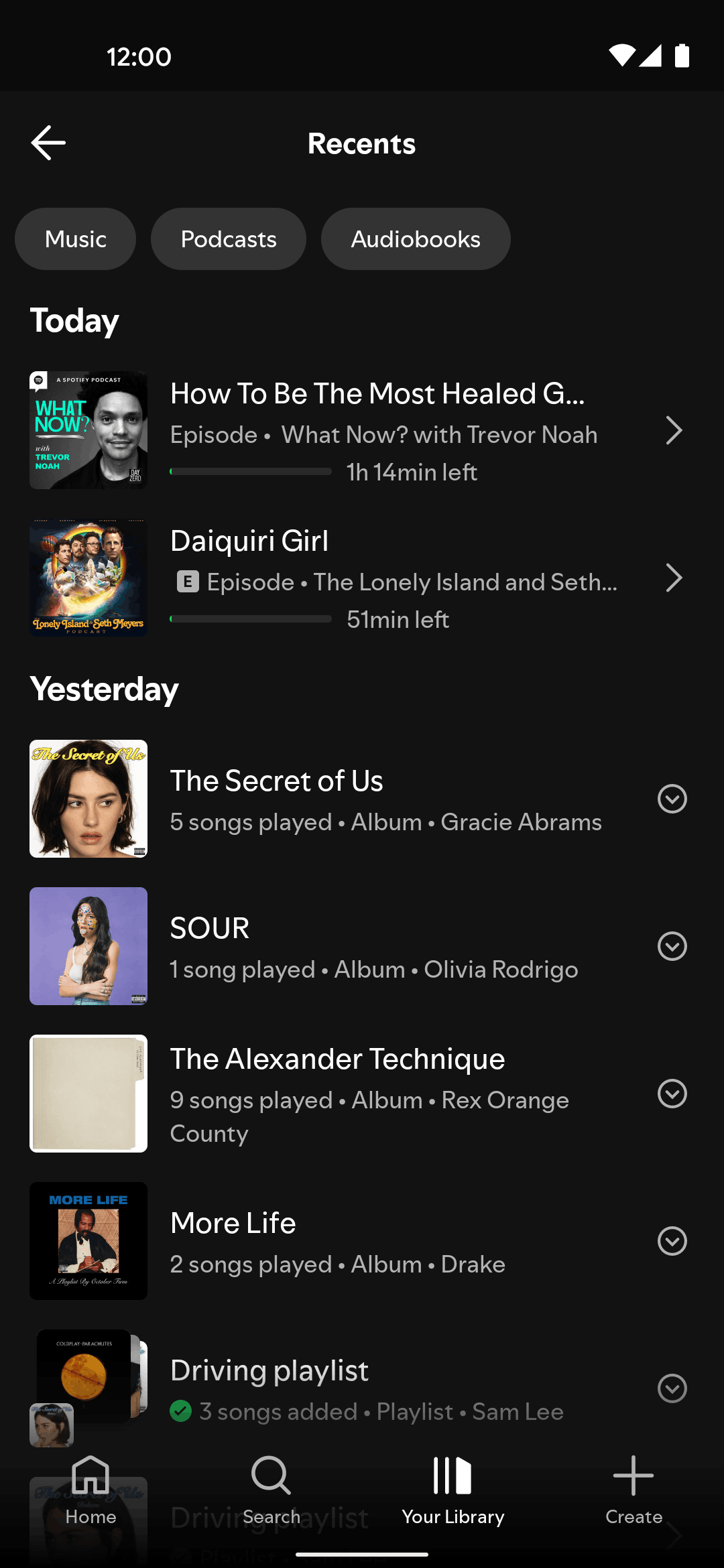
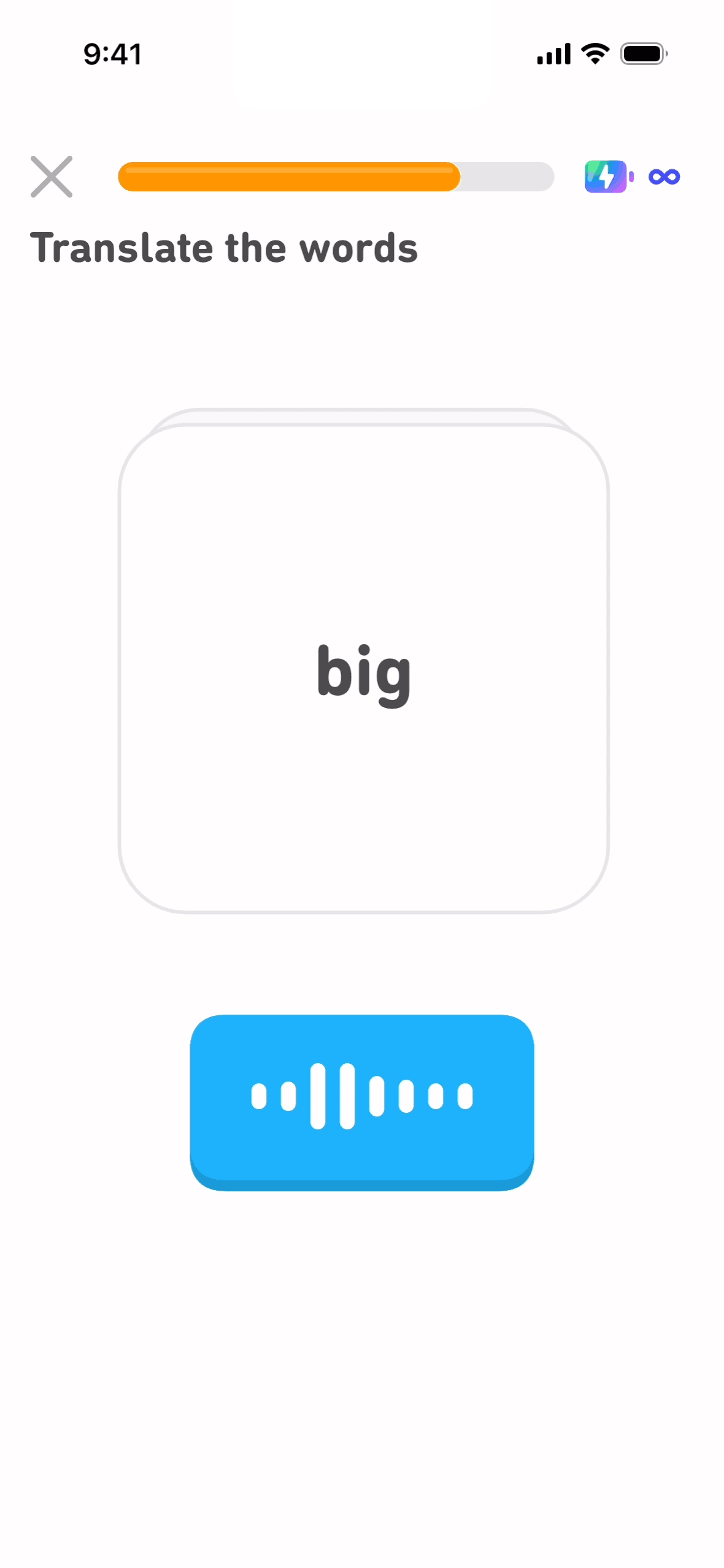
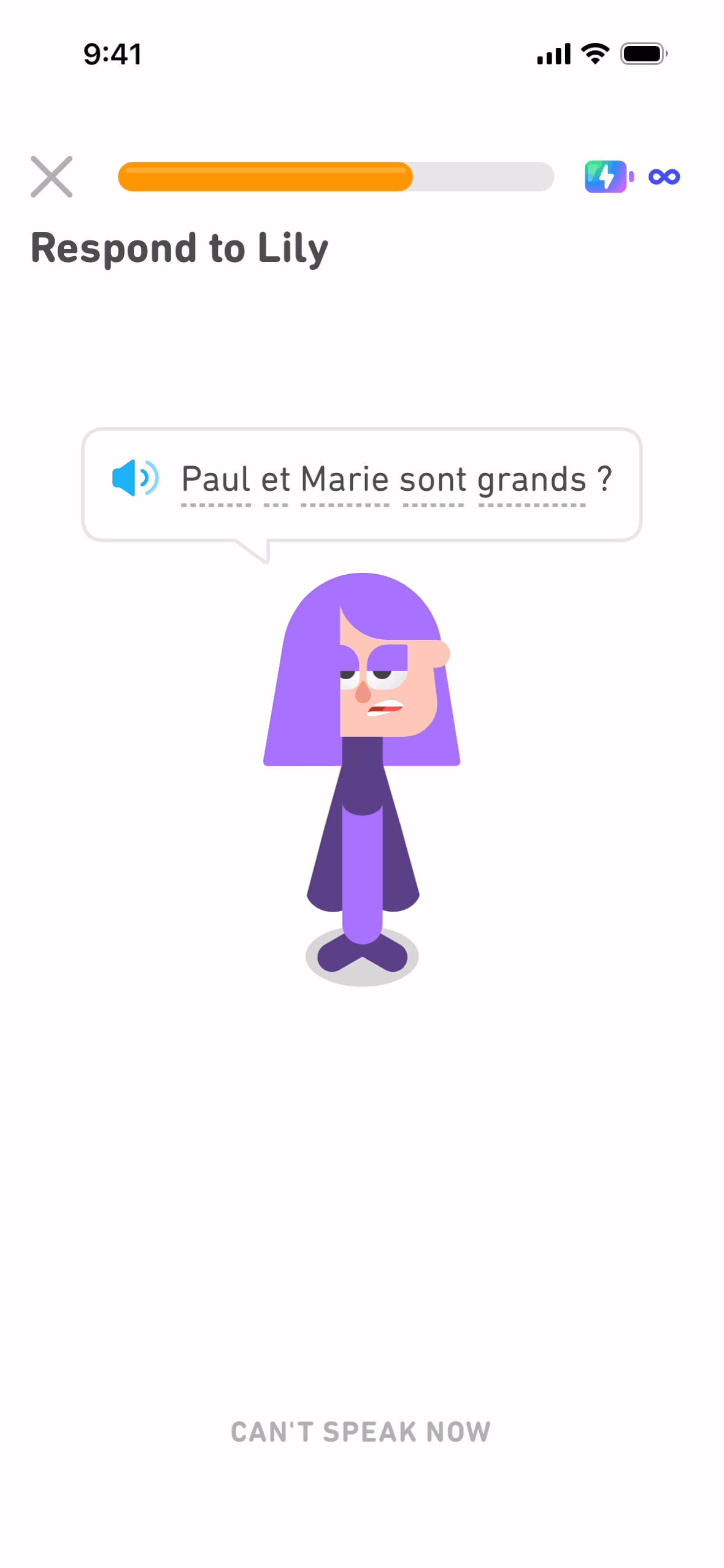
- Onboarding (Duolingo, Streaks, Headspace)
- Paywall (Calm, Strava, Notion Plus)
- Notification permission ask
- Day-N retention hooks
Marketer / growth designer
- Landing pages (for example, Land-book's current public offer)
- Pricing pages from a useful set of products in your category
- Signup flow
- Email confirmation flow
Indie hacker
- Relevant flows from a small set of apps you admire — capture the states needed for the decision
- Gummble's editorial showcases for written analyses
Common mistakes when researching flows
1. Studying only the happy path
Real users hit errors, offline states, and edge cases. The error handling tells you more about UX maturity than the happy path.
2. Not annotating
A folder of screen recordings is just video. Without annotations, the research doesn't translate to decisions.
3. Studying screenshots when you should be studying flows
One onboarding screen can show visual treatment, but a longer sequence adds progression, branching, and recovery context.
4. Researching only direct competitors
Adjacent products can reveal alternatives that direct competitors do not use. For example, a B2B SaaS team might include a consumer onboarding flow when testing different teaching or motivation patterns.
FAQ
Where can I find UX flow examples for free?
Gummble's free browsing, app-store listings, manual install and capture, and public walkthrough videos are starting points. For organization, downloads, collections, or MCP access, compare the capabilities shown on Gummble's current pricing page.
What's the best paid source for UX flows?
There is no single best source for every workflow. Compare Gummble for category-led screen and flow research with video-oriented sources such as Page Flows, then verify that the apps, states, and export options you need are included in the current offer.
How do I capture a flow manually?
iOS: use the built-in Screen Recording tool (Settings → Control Center → Add Screen Recording). Android: use the built-in Screen Record feature. Mac: use QuickTime → File → New Screen Recording. Budget time to obtain access, capture relevant states, redact personal data, and annotate the sequence.
Are App Store screenshots enough for flow research?
Not by themselves. App-store assets are selected for marketing and may omit setup, errors, permissions, or recovery states. Supplement them with a library such as Gummble, Mobbin, or Page Flows, or capture the particular journey yourself. Confirm coverage in each current catalog rather than assuming every app has a complete sequence.
What's the difference between Gummble UX Flows and Mobbin's flow recordings?
Both provide real-app references, but their current catalogs, organization, and plan limits can differ. Gummble organizes available flows by category and provides editorial context where published. Review Gummble's current plans and Mobbin's official offer, then test the specific apps and workflows you need.
How many flows should I study before designing my own?
Start with enough direct and adjacent examples to identify repeated decisions and meaningful alternatives. Stop when additional examples no longer change your requirements, risk list, or design rationale; the useful sample size depends on the product and the decision.
Bottom line
UX flow research in 2026 works best when journey context complements individual screenshots. Gummble UX Flows offers category-led browsing, while app-store listings, manual capture, public videos, and other libraries can fill different coverage needs. Check the current Gummble plans and each provider's official offer before paying.
Related:
Founder of Gummble. I build and maintain the Gummble catalog — UI screenshots and UX flows from 1,500+ real iOS, Android, and web apps — and write about the design patterns I see across them.
About Azura →See these patterns in action
Browse 1,500+ apps across shipped iOS, Android, and web products.
Browse the Library →